четвер, 30 листопада 2017 р.
What is a Podcast?
Hi, friends! I found a short video, that provides a brief introduction to the technology of podcasting and mentions a few of the instructional benefits and considerations for using this new medium for information delivery👀😎😊

середа, 29 листопада 2017 р.
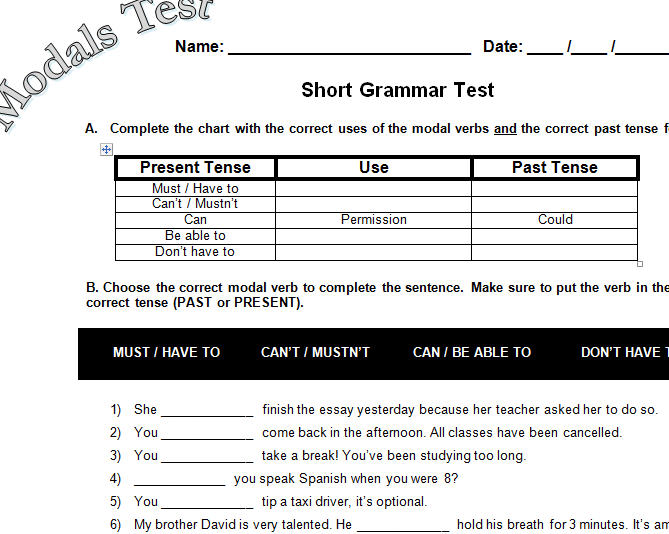
Modals Test: Must/Have to (obligation), Don't Have to (absence of necessity), Can't/Mustn't (prohibition), Can (permission), Be Able to (ability).
his worksheet was originally created for a middle school ESL class with an intermediate level. It can also be used with an advanced class to review grammar. It focuses on the specific modal verbs: Must/Have to (obligation), Don't Have to (absence of necessity), Can't/Mustn't (prohibition), Can (permission), Be Able to (ability)
It does not include should would, may, might or shall.
I hope you like it.
It does not include should would, may, might or shall.
I hope you like it.
вівторок, 28 листопада 2017 р.
понеділок, 27 листопада 2017 р.
WHAT IS A PODCAST?
WHAT IS A PODCAST?

Before diving into a lengthy explanation of what a podcast is, let’s look at the word “podcast” itself. First mentioned by Ben Hammersley in a 2004 Guardian newspaper article in which he rattled off possible names for this booming new medium, the “pod” of podcast is borrowed from Apple’s “iPod” digital media player; and the “cast” portion of podcast is taken from Radio’s “broadcast” term. As a mater of clarity, just because it’s named after Apple’s iPod, does not necessarily mean that you have to own or use an iPod — or any portable digital media player for that matter — to enjoy a podcast.
Okay, with that out of the way, back to the original question: “What’s a podcast?”A “podcast” is sort of difficult to explain because there really isn’t anything else like it — but rather, many things that are kind of like it.
A good starting point, is to think of a podcast as “Internet Radio On-Demand.” It’s similar in that you can usually listen to it on your computer — but it’s more than that. [However, and not to confuse the issue, podcasting isn’t confined to just audio but can be video as well].
It has well over 100,000 content specific “channels,” which are sure to suit just about anyone’s interests, and is available on the Internet. So, in a sense, it’s kind of like a Library.
With the amount of content that podcasting provides, regular Broadcast Radio, or “Terrestrial Radio” — as they call it — simply can never compete.
The AM and FM radio band only has so many channels. Consequently, radio stations “Broadcast” their content —
meaning that they attempt to appeal to as broad of an audience as possible. Because, after all, this is what advertisers are looking for. But podcasting, by contrast, is not necessarily hamstrung to advertising revenue like its broadcasting cousin. With its specific and specialized content, it is able to “narrowcast” to only those who choose to listen. So while a particular podcast’s audience may be considerably smaller than the audience of a broadcast, one could argue that the podcast’s audience is a much more targeted and interested in the content being delivered. So, in a way, Satellite Radio, with its ability to provide more channels than Broadcast Radio, takes a step towards podcasting — but still does not come close.
Podcasts are “On Demand” and can be listened to on your schedule — not when a Radio Station decides to air it. So, it’s kind of like TiVo.
Each podcast has a website it calls “home” (like ours at gunnation.us) where show episodes can be listened to or downloaded for future listening. With downloaded media, you can either listen to it on your computer or take it with you by transferring it to an iPod or any other portable digital media player. So, in this way, it’s kind of like a small paperback book.
But what truly makes a podcast unique, and what gives a podcast its “casting” ability, is how it is able immediately deliver itself to multiple podcast directory websites (such as iTunes, Podcast Alley, and Podcast Pickle) and podcatcherapplications (like iTunes, Juice, and Zune) through a process of syndication known as RSS (Real Simple Syndication). Listeners can easily “subscribe” to podcasts (most are free) by clicking on its RSS icon or subscription button (ours is located in the upper left hand column). The listener is then walked through how to add that podcast’s syndication “feed” to a podcatching application of their choosing — or even good old-fashioned email. So, when a podcaster releases a new episode, subscribers are automatically notified without having to constantly check back with the podcast’s website to see if a new show has been produced. And, with the podcatching software, episodes of their favorite podcasts can be automatically downloaded and, if they choose, transferred to their portable listening device — all without having to lift a finger. So, in this way, podcasts are like magazine subscriptions.Podcasts can be produced by just about anyone wanting to share and communicate with the world. They are not exclusive to Big Name Media. So, you could also say that podcasts are like Blogs.
Because podcast websites usually have ways for listeners to leave comments about each episode, and literally enter into a discussion with other listeners, podcasts are like a community of individuals sharing a common interest. And with an estimated 47 million podcast listeners out there in 2010, that’s a pretty hefty community.
Kind of cool if you ask me.
Still confused? The folks over at Common Craft have put together a nifty little 3 minute video that put’s it all in plain English. Perhaps that why they’ve entitled it “Podcasting in Plain English.” I encourage you to give it a view. It’s informative, easy to understand, and entertaining all at the same time.
How to Record a Podcast on your Mobile Device
Podcasting on the Go: How to Record a Podcast on your Mobile Device

Given podcasting’s spontaneous nature, it’s more than likely that you’ll run into a time or ten where you have a great idea you want to share or a conversation that needs to be heard, but you don’t have your usual equipment to get things up and running. That’s where mobile recording comes in.
Knowing how to record a professional-sounding podcast on mobile will broaden your reach, heighten your capabilities, and ensure that you don’t miss an opportunity to share vital information with your listeners. Even if you have no plans to go mobile right now, there’s every reason to have the ability to pull these skills from your back pocket at a moment’s notice—after all, some of the best, most impactful opportunities come without warning.
With the podcasting market booming, a quick search on Amazon will return over 200 pages of equipment to help with recording, which can be more than a little overwhelming. So we broke down what we believe to be the best options for recording on your mobile device based on versatility, transportability, affordability, and, of course, sound quality.
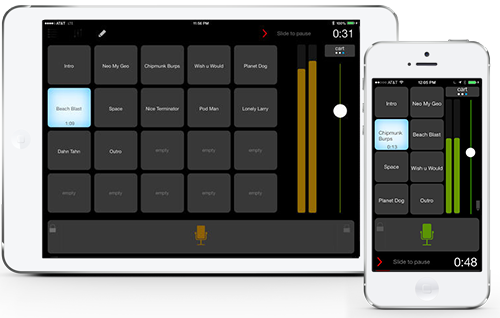
BossJock Studio
There are an endless number of apps that record audio, but only a few that do so with professional sound quality, and even fewer that will record two mics simultaneously (a critical feature if you plan to do any interviews).
That’s why BossJock Studio is considered by so many to be the holy grail of pro-quality recording on the go. It’s only $10 and lets you export directly to your account, as well as upload and publish your content as an mp3 file, all the while delivering killer sound quality.

iRig Mic Lav


When looking for a mobile microphone, you want it to be compact, durable, and capable of recording high-quality sound. The iRig Mic Lav meets that criteria and then some.
It’s a hands-free mic that literally fits in your pocket and provides professional-quality recording for an iPhone, iPad, and Android. It’s also “chainable”, which, in human speak, means you can easily link two mics to the same device, making it super easy to record interviews.
TwistedWave
 You’ve got your app to record awesome content, you’ve got your mics to make it sound great, now all you need is an editor to polish it up for publishing.
For $10, TwistedWave offers detailed editing capabilities with a super simple, intuitive interface. Using just your fingers you can make precise, accurate selections on the screen of your phone or tablet, which are easily transferrable back and forth to the aforementioned BossJock app for easy publication.
Oh, the liberation!
No longer bogged down by big bags of expensive equipment, with these three products in your pocket (literally), you can take your podcast to any conference, show, coffeehouse or hotel and produce professional, high-quality results in a pinch.
A quick note of advice on mobile recording
While these tools are capable of producing a high-quality podcast, they’re not miracle workers. A fully-equipped studio will give you marginally better results than any mobile apps can deliver, but that’s no reason to miss the ample opportunities that come with being able to record on the go.
A lot of folks tend to get caught up in perfect production when that energy would be much better spent on quality content. Mobile podcasting will inevitably come with certain limitations and an air of rawness that you might not get in a studio, but if the content you’re providing is stellar, most listeners couldn’t care less if production isn’t picture perfect.
неділя, 26 листопада 2017 р.
Can and can't for young learners. The worksheet contains a variety of pictures in which students will have to circle and cross depeding on the sentences given. E.g., She can dance. She can't cut. Students will have to circle the picture of a girl dancing and to cross the picture of a girl cutting. Then, students have to color the affirmative sentences represented in pictures.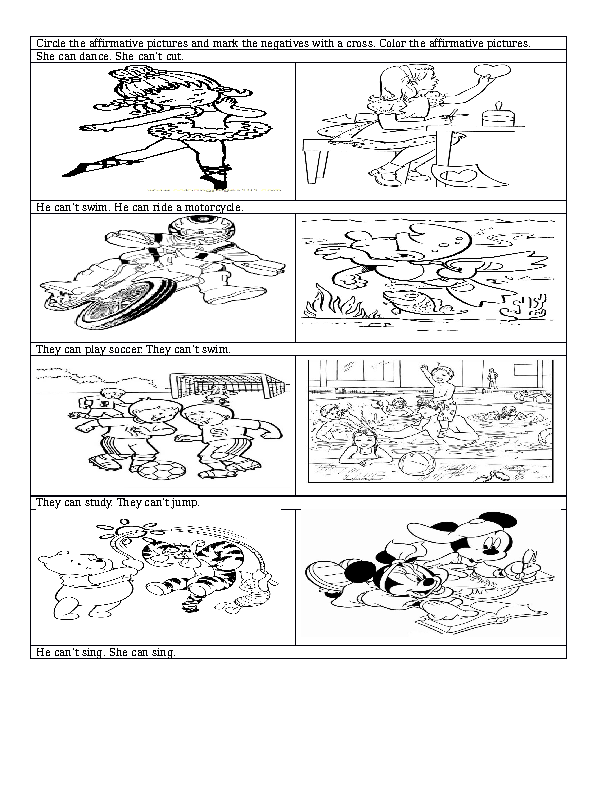
субота, 25 листопада 2017 р.
Strategies for keeping attention

Here are some reasons why students’ attention may wander and ways to keep your classes on track.
- Keep in control. Anticipation is the best form of teacher defence so keep scanning the room, making eye contact with all students. You will catch those who are starting to fidget, look out of window or chat to their mates. Then you can react accordingly before the noise level has distracted everyone and created a situation.
- Keep in tune with the class. Don’t just glide along with the best. If one student answers your questions this is not proof that all the others are following what is being discussed. Aim for responses from as wide a sample as possible. Don’t just accept answers from the 3 or 4 class leaders or you will leave the rest behind.
- Keep checking understanding. Try not to use questions like “Do you understand ?” or “Has everyone got that ?” Students are notoriously wary of admitting they haven’t understood, especially if their peers are feigning comprehension! Use further questions to see if they have understood the concepts.
- Keep demonstrating. Attention wanders when they don’t know what to do and are too afraid to admit it. Keep your instructions to a minimum and demonstrate what to do rather than giving lengthy or detailed explanations. If nearly half of them are clearly unsure and starting to flounder or chat in their mother tongue, take action. Call on the pairs who are doing the task successfully to demonstrate their work as an example for others then try again.
Changing the paceHere are some tried and tested techniques for changing the pace of the lesson to keep students awake.
- Chant. Select a weekly chant which rouses students. Students stand or sit, clap along or snap their fingers and repeat the rap you have devised. This can be a quotation for higher levels or a sentence construction covered by lower levels. Make it short, snappy and fun.
- Drill. Use some quick fire questioning around the class and involve as many as possible. Then get the students to do the questions as well as supplying answers. Use visuals as prompts for this questioning.
- Play a game. Do a 10 minute revision game involving everyone pooling ideas, words or questions. Even a spelling game for beginners does the trick. Word association or memory games work well!
- Give a dictation. They do have to concentrate here ! It might be just a short piece of text or a list of words .It could be some lines from a song in the charts.
пʼятниця, 24 листопада 2017 р.
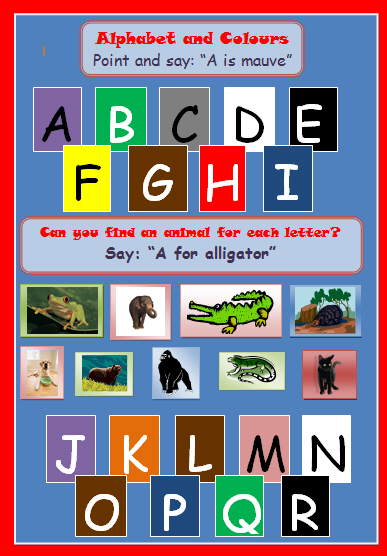
This worksheet is mainly for the younger ones, but could be used with older students. They will already have learned the colours and alphabet so with this worksheet in the first part they have to point to the letter and say: "A is mauve". The teacher will correct pronunciation especially of the alphabet which is very important when spelling. In the second part they have to find an animal for each letter of the alphabet; the pictures are also on the page.
четвер, 23 листопада 2017 р.
Scrabble Style Phonics Game
A great game for teaching phonics to ESL students. I printed two sets, cut them out and laminated the game pieces to make them a little more durable.
I play this game when teaching vowel sounds, and after they've learnt ABC's. First, I use the vowel sound that we're working on and put it on the board. For example: _a_. Students draw two cards from a bag or hat and must make a crazy word. Example: student draws T and M. The student can make the word "mat" or "tam". Then they get the points on the cards, which in this case would be 7 points. For this game I remove the vowels from the bag.
The students seem to love making crazy and strange sounding words, and it forces them to practice their phonics skills as opposed to memorizing phonics words, and not the rules.
You can also play with many vowel sounds including mixing up long and short vowels to keep the young ones on their toes.

I play this game when teaching vowel sounds, and after they've learnt ABC's. First, I use the vowel sound that we're working on and put it on the board. For example: _a_. Students draw two cards from a bag or hat and must make a crazy word. Example: student draws T and M. The student can make the word "mat" or "tam". Then they get the points on the cards, which in this case would be 7 points. For this game I remove the vowels from the bag.
The students seem to love making crazy and strange sounding words, and it forces them to practice their phonics skills as opposed to memorizing phonics words, and not the rules.
You can also play with many vowel sounds including mixing up long and short vowels to keep the young ones on their toes.
середа, 22 листопада 2017 р.
7 Tricks To Help Remember New Words Quickly & Easily

Words, words, words…so many to learn and it’s so hard to remember them all, let alone use them, right? Well, today I’ve got seven tips that should make learning & remembering new vocabulary easier, faster, more fun, and more effective.
1. Make word association webs – our brain takes what we read and makes it into images, ideas, and feelings etc. and then makes connections between what we knew before and the new information (words and ideas). This is how we remember things. The “new” stuff is fitted into the “old” stuff. Think of a tree. It is easier for you to see a big tree with lots of branches and leaves than it is to see a small tree with very few branches and leaves, right? Well, it’s the same for your brain. When you connect a new word or idea to things you already know you make it easier for your brain to find (see) it when you need to remember it. How can you do this? Easy. Make an Idea Web. Start with the thing you want to remember (words, ideas, sentences) in the middle of a piece of paper. Then draw lines from it like a spider’s web. At the end of the line write down any ideas or words or even pictures that you think of when you say the word or idea in the middle of the page. Anything you think of is ok…just write it down.
This only takes about 2 minutes. Now all the words/ideas are getting connected in your mind. If you see or hear one of them it will help your brain remember all of the others. To make this work really well, you can talk to yourself about how each word/idea fits together with the others. The more you do this, the more connections you make. Lots of connections makes it very easy for your brain to “see” the word you want to recall when you are trying to remember it.
2. Remember in Chunks (collocations) – Remembering the word is important but English, like Chinese, is a language and languages are NOT just facts to be remembered – they are tools for people to USE to express their ideas and communicate. So, find examples of how each word is used in your text. Write a few words before and after the word so that you remember how it is used. For example: if your word is “arrogant” write something like this….”the tall, arrogant man” … This will help you to remember that “arrogant” is an adjective and that it describes people. The next thing to do is to make 3 full sentences with the word to practice using it.
3. Use pictures – Draw small pictures that show the meaning of the word if you can. Sounds crazy, right? That’s why it works. Our brains have so much normal information coming in every moment that a crazy image is a nice surprise – and you always remember surprises, don’t you? Our brains are also specially designed to catch and understand visual information quickly. So, make a funny picture that shows the meaning of the word you want to remember and your brain will remember it easily.
4. Tell a tall story – I always hear my students say that there are too many new words to remember. There’s a memory trick you can use to do this. Just make a crazy story that uses all the words. Picture it in your mind as you make the story. We remember stories easily, especially crazy stories that we can imagine in detail in our minds. Repeat the story and you will remember the words. When you make the story connect the words in funny ways. For example, if you want to remember these 20 words:
shoes, piano, tree, pencil, bird, bus, books, driver, dog, pizza, flower, basketball, door, television, spoons, chair, jump, dance, computer, stone….you could make a story like this:
There is a piano wearing shoes and sitting in a tree. The tree is strange because someone has stuck a giant pencil through it. On the pencil a bird is sitting and watching a bus full of people reading books. Even the driver is reading a book which is bad because he isn’t paying attention to driving. So, he hits a dog that is eating a pizza in the middle of the road and kills it. The driver digs a hole and buries the dog in it and then puts a flower on it. He notices that there is a door in the dog’s grave and opens it. Inside he can see a television with 2 spoons for antennas on top of it. No-one is watching the television because they are all watching the chair. Why? – Because the chair isjumping and dancing and throwing stones at the computer.
Try it. You’ll be surprised!
5. Recycle the pieces – Use roots, prefixes and suffixes to guess what a word means. For example:
Maybe you don’t recognize this word “microbiology” but may be able to guess what it means. First, look at the prefix “micro”. Micro means very small. You may also remember that “ology” means a subject, the study of something. Already we know that part of this word’s meaning is “the study of” + “something small”. Now, you will probably remember that “bio” means living things. So, we can figure out that microbiology probably means the study of very small living things. This is correct. English is like a puzzle – we put the pieces together to make new words. So if you make a list of word beginnings that you often see (un-, dis-, con-, micro-, etc.) and word endings that you often see (-able, -ly, -ent, -tion, -ive, etc.) and remember what they mean, you will be able to guess what many new words mean.
6. Think & learn in opposites – Learn words with opposite meanings (antonyms) and words with similar meanings (synonyms) together. For example, learn angry/happy (antonyms) and angry/cross (synonyms) at the same time. We can remember similar and opposite things more easily because they “stick together” in our minds.
7. Timing is everything – According to psychologists who study how we remember anything, there is a better way to learn things quickly and permanently. Use the new word immediately. Use it 10 minutes later. Use it 1 hour later. Use it 1 day later. Use it 1 week later. After that, you’ll rarely have to review – the new vocabulary is yours forever.
Have Fun!
вівторок, 21 листопада 2017 р.
PREZI VS POWER POINT
PREZI VS POWER POINT, WHICH IS BETTER FOR WOWING AN AUDIENCE?
Prezi vs PowerPoint: Which is better for wowing an audience? Comparing the two is quite difficult because both of them have pros and cons in terms of their usage. Whatever you choose, the result of the presentation will greatly depend on the content and the way you present it. However, better understanding on the two programs is a must for you to make a wise decision in choosing the most appropriate program for your school project or business presentation.

Want to dig deeper and know the pros and cons of each program a bit better? This article will help you to fully understand the use of Prezi and Power Point.

PREZI VS POWERPOINT
POWERPOINT
PowerPoint is a Microsoft program used for slide show presentation which is commonly used for teaching, product launching or sales presentation. You can enhance the capabilities of this program using third party add-ins such as PPTools, pptPlex and TechRepublic. PPTools have starter set which facilitates quick importing of pictures, easy zooming function, and more. pptPlex help you to go directly into your chosen slides plus you can easily navigate the zoom in and out settings. There are also interesting add-inns that you can use from TechRepublic app. The good thing is Powerpoint does not rely on an internet connection and it is supported by many other systems that allow you to upload ppt and share your slides.

Pros
- It provides custom animations with three kinds of movements including entrance, emphasis, and exit effects.
- It contains slide layouts which allow users to change the fonts, colours, designs, and backgrounds.
- You can add effects between slides by adding different slide transitions so that your presentation can be more interesting.
- It can create an enjoyable presentation that includes sound and music.
- You can add narration or video clips in your slides.
- If the presentation will be needed in hard copy, slides are printable.
- Inserted hyperlinks can be easily open by simply clicking the web link.
- Presentation can be navigated and displayed on a computer.
- It is user-friendly.

Cons
- Slide format sometimes offers difficulty in going back to a certain slide while conduction your presentation.
- Clip arts and graphics are outdated.
- Readily made slide layouts are quite few.
- Inserting photographs can be inserted in two ways- vertically or horizontally.
- You have to install the software in your computer as part of your Microsoft Office.
- You have to buy an overhead projector and a slide projector for larger audience.

PREZI
Prezi is different from PowerPoint in terms of interface. It contains a zooming user interface (ZUI) allowing users to zoom in and zoom out of their media presentation. Since, it is a software program with flash-based feature, instead of a slide Prezi starts with a blank canvas. If PowerPoint employs linear format, Prezi is non-linear. This software is made to replace the slide-based presentation so that the presenter can easily jump into different topics and ideas.

Pros
- Prezi presentation has zoom in and zoom out function which is very easy to navigate. If you are discussing a particular topic, simply zoom in your canvas with the information that you want to give emphasis.
- It is quick and easy to insert images, audio, and video. Photos can be inserted at any angle you desired. Users can zoom, rotate, resize, or edit a certain object.
- Presentations can be embedded into a webpage or blog.
- It allows user to customize their design pages by making them look like a real newspaper or a magazine article.
- Since it is a web-based software, working in any computer with internet connection and Flash is easy.
- It is compatible with almost all web browsers and modern computers.
- It contains frames which allow users to group multiple presentation media into a single presentation.

Cons
- It requires knowledge and skills in using this program since it is a newly developed software which is not widely used especially in schools. Learning the program before making a presentation is a must.
- Some people are disturbed with the zoom function and animation used within the software.
- In order to work with your presentation offline, you have to purchase Prezi Desktop which is more expensive than Microsoft Office.
- It does not allow editing the readily made templates as compared to PowerPoint in which you can change the font and color schemes in the templates.

PREZI VS POWERPOINT: CAN YOU DECIDE NOW WHICH OF THE TWO HAS A WOW FACTOR?
Look at the convenience of your own choice. Consider your profession and the nature of your job. Whether you are an educator, a sales representative, or a business man, PowerPoint is much suited in creating a more professional presentation. In the Internet there are large collections of sales PowerPoint templates, themes, and slides perfect for your business plan and sales presentation. Slide Team, VisualBee, and Slidevana provide useful slide templates perfect for your specifications and needs. In addition, PowerPoint connects up to excel making it very useful for sales presentations.
Prezi , on the other hand is suited to keep your audience engaged. It has a powerful effect in showcasing your company. For engaging presentations prezi is the best choice, or ones that have a story. Think of prezi like a moving infograpihc and powerpoint as a well thought out manual.
PREZI VS POWERPOINT: BEST FEATURES OF EACH
Powerpoint is great for simplicity, quick to create a presentation that needs to convey information. It is a common tool for presenting information in various academic activities such as school projects, lectures, and seminars wherein the audience is after of the information that they will get from the lecturer or presenter. However, Prezi is a more appropriate program for young people. Children are fond of flashy effects, funny animations, and unique visuals. The attention and focus can be maintained while you are discussing something.
Whenever you are choosing a program for your future presentation, consider always the type of audience that you have. Decide now on what will you use for your future presentation, Prezi vs PowerPoint?
понеділок, 20 листопада 2017 р.
Useful tips for students
How to learn English faster: 10 tips

English is a fun language to learn (here are 9 reasons why it rocks), and even though it’s considered an accessible and relatively easy one to learn, with 750,000 words and spelling that can throw off even the most skilled learner, learning English fast can seem impossible. But I’m here to tell you that it isn’t – as long as you have the right strategy.
Take these 10 tips on how to learn English faster as your starting point and you’ll master this wonderful language in no time!
1. Read everything you can get your hands on
Classic literature, paperbacks, newspapers, websites, emails, your social media feed, cereal boxes: if it’s in English, read it. Why? Well, this content will be full of juicy new vocabulary, as well as a fair amount you already know. This helps you improve quickly, as re-exposure to learned vocabulary gives you new examples in context, therefore reinforcing those words in your mind. On the other hand, learning new words and expressions is essential to building your vocabulary arsenal, particularly in a language like English with so many words! However, don’t just read and move on – next, you’ve got to…
2. Actively take note of new vocabulary
This tip is a classic one for good reason: it works! When learning, we often enjoy a new word of phrase so much that forgetting it seems impossible. But trust us, not everything sticks the first time. To fight this, get into the habit of carrying around a funky notebook or using a tool like Evernote. Whenever you hear or read a new word or expression, write it down in context: that is, in a sentence and with its meaning noted. This saves you time as you won’t return to that word and ask yourself: “What did that word/expression mean again?”
3. Talk with real live humans
What is a language for if not to communicate? Sure, we humans have become experts at communicating without opening our mouths – thanks Whatsapp! – but when push comes to shove, it’s true that speaking a language helps it stick in your head far better than only reading or writing it. Just think of how many times you’ve heard people say that they “understand, but can’t speak English.” A lot of would-be English speakers have turned talking into a huge insurmountable barrier that only serves to psyche them out. Don’t be like that. Seek out native speakers for an informal language exchange, enroll in a course, or take classes online.
4. Subscribe to podcasts or Youtube channels (in English)
Like humor? Politics? Blogging? Cooking? With topics covering every interest imaginable, there’s an English-speaking podcast or Youtube channel out there for you. Subscribe to a few and listen while driving or watch during the commute to school or work. At first, you might find the native accents difficult, but stick with it and you’ll soon start to understand what you hear (as well as learning lots of new vocab from a native speaker!)
5. Go abroad
If there’s a better way to learn English than being immersed in it while living and studying in an English-speaking country, we’d love to know! It’s no secret that English is the most widely-spoken language in the world, and with a long list of countries to choose between, you can select your ideal learning environment based on hemisphere, weather, or favorite city. Think Australia, New Zealand, the UK, the US, Canada, and South Africa to name a few!
Taken from https://www.ef.com/blog/language/how-to-learn-english-faster/
пʼятниця, 17 листопада 2017 р.
How to Become the Best Teacher Students' Advice
How to Become the Best Teacher
Students' Advice
And when you are a teacher, it becomes even more difficult to become perfect for ALL your students. It's clear, that we all are different, so your students are, and each of them has his own learning style. When your teaching style suits a learning style of your student, you will definitely become his best teacher ever. This is like to be on the same wave with someone. But it's obvious, that all your 30 students (or 20, or even 10, it doesn't matter actually) will never have the same opinion about your teaching methods, so, misunderstandings are impossible to avoid.
However, you always can become a better teacher for your students, the main thing is to listen to them carefully. Here we have 10 advice from students to teachers, that will help you understand their principles better. You teach them of course, but you can always let them teach you a bit as well, can't you?
So, if you want to become the best teacher for your students, you'd better not ignore what they say.
Let Your Students Help You Be a Better Teacher for Them
- 1
A good teacher is an assertive teacher
Your students can have problems, bad days, stress, or even depressions as well. If you see that some of your students start to study worse, have no desire to do all schoolwork you give them, and just want to give up everything, do not be in a hurry to argue and tell them about how bad or lazy they become.You can become like a parent to them. Support your student, ask about what happens to him, push him to do better. If you see that your student is depressed, maybe it would be better to meet with him after classes and find out what exactly is going on. - 2
Be their friend, but don't go too far
Students just don't like when their teacher starts behaving like a student himself. Stay professional, help students with schoolwork, listen to them, talk about their lives, but remember who you are. Even if you are a young specialist, and you are almost of the same age with your students, there is no need to use all those slang words (even if you use them in your everyday life).Your students will find it rude and unprofessional. As far as you understand, this is not the best method to get a good reputation. Your students just will not take you seriously. - 3
Make your lesson relevant to their lives
If you want your students to remember your lessons, just try to connect the information you provide with some moments of your students' life. You can use some of them as an example, describing this or that situation: it would be more interesting for them to visit such lessons, but not those boring ones where you try to explain them the importance of differential equations for our science.Just try to come up with an example, how these differential equations can help THEM in the future. - 4
Your time should be used wisely
Remember who you are and where you are. Students don't like, when their teacher begins to tell them about his life, how better it was when he was younger, how better and more patient all students were then, blah-blah-blah. Your student visits your lesson to learn something on the subject, so, don't give him a reason to miss this class next time.Remember, that time is important for your students as well, so, they would not be happy to waste it for lessons which don't give them anything except personal stories from their teacher's life. - 5
More explanations
Even if you consider yourself a cool teacher who explains everything in a way that even the stupidest person would understand you, don't be lazy to explain it to your students several times, and what is even more important – try to do that in different manners. Sometimes, they really don't get it, but it's not because they are stupid: maybe some of them just think different.Be patient, and explain your material over and over again, making sure all students understand what you're talking about. You know, how difficult it will be for them to learn further, if they don't get the basis. - 6
Teach in a variety of ways
Don't be lazy to use as many different materials for your lessons as possible. Students believe that the best teacher is able to teach in a big variety of ways: use books, videos, music, presentations, speeches, and everything that can be interesting for your students to accept (you know them better, so, you will definitely come up with good ideas).If you show them a video, then give some papers with facts described in that video, then tell them all this info yourself, it will be much easier for your students to understand and get the material. - 7
Be firm
It doesn't mean you should be a dictator. But students do not like teachers who are too soft and mild. Too nice is not always nice, especially when it comes to teaching. There are always some students in a class (we think, you remember all those movies about high schools), who will try to persuade you that they do not need the material you give. Don't make a sad face like that Okay meme on the Internet has!Just stay consistent! - 8
A good teacher always has objectives
When you start a lesson, make your students understand clearly what they will learn today. You should have clear objectives, as such a plan will help students concentrate and know what they are supposed to do during this class.You can write something like “do nows” on the board, or just tell them your plan step by step. - 9
Be a good example for your students
One student has told us a story about his teacher, who always brought tasty organic food and shared it with those students who didn't bring lunch with them. He looked younger and very energetic, and some students changed their mind about what they age, because they just wanted to look like a teacher.This is an example of a teacher who influenced his students positively. If you follow this advice, your students will thank you. - q
Believe in them!
Don't ignore your student, if you see he is not interested in your subject, or he doesn't understand anything. Just try to believe in everyone, and don't leave any of your students behind.Ask each of them to explain what exactly they don't like or understand, explain this once again, make sure they've got it this time. It is very important for a student to feel the support of his teacher and know, that he will always help when it is needed.
четвер, 16 листопада 2017 р.
ICT in English classroom
It is important to acknowledge that students are already interested and engaged in using technology, this creates many amazing opportunities for schools and teachers to benefit from integrating some forms of technology in the classroom and to make teaching and learning more effective.
ICT benefits:
- enhanced levels of motivation,
- students’ active participation and self expression, opportunities for:
- authentic language use,
- increased language input and output,
- increased learner participation,
- using the target language in meaningful situations,
- student collaboration and socialization,
- developing language and intercultural awareness,
- working across the curriculum, etc.

Tools to create contents and share them:
– Online Office Software (Google docs)
– Slides

– Timelines
– Concept mapping

–Wikis

https://docentesenextremadura.wikispaces.com/ICT+Resources+for+Primary+English+Teaching
Press
– BBC

– National Geographic

Encourage teens to read
– Reading Rockets

– OUP

Підписатися на:
Коментарі (Atom)