
понеділок, 4 грудня 2017 р.

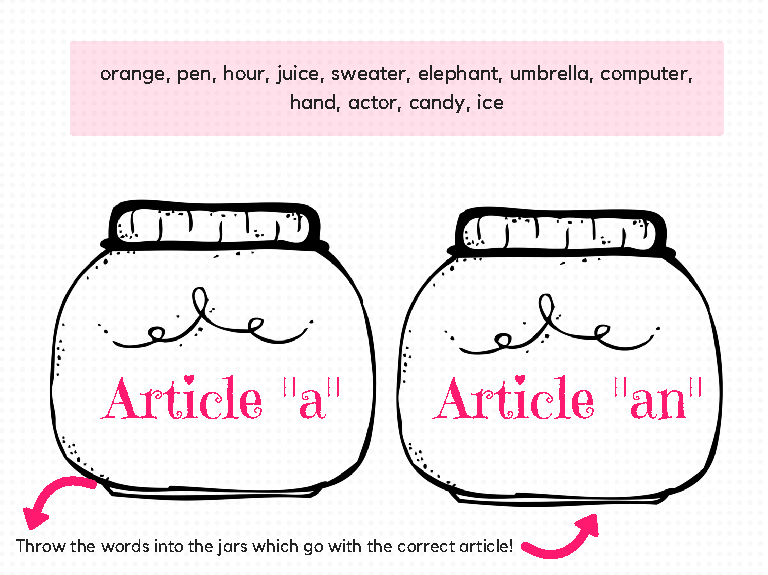
This printout is aimed at sorting out the usage of a/an article. It would be great if the teacher helped with pronunciation of the words (for example "hour"). The printout gives students the feeling of a game when picking words and putting them into colorful jars.
This is an activity to play with young learners. The objective is to make sure they know the color by the name. There are 11 colors divided between the colors chart, they are: red, yellow, blue, green, pink, white, black, gray, brown, purple and orange. Write them down on a piece of paper, put them in a cup and sort them, the kid that completes all the colors must yell: 'Bingo!' and get the prize.

субота, 2 грудня 2017 р.

Useful tips for students

7 Time Management Tips for Students

7 Time Management Tips for Students main image
With exams approaching, you should be thinking about how to get better at time management and organize your days so you can strike the right balance between home, work and university life. You should also try and eat some brain food - and no, we don't mean crisps and energy drinks!
By taking the time to arrange your priorities, you can give yourself the best chance of staying on track and organized during the exam period, which in turn can help reduce stress levels, something that can be the difference between success and failure at university.
Take a look at our top seven time management tips, so that you can do your best at university and also find moments to relax and even earn some money on the side.

1) What do you have to do?

The first stage of improving your time management is to list absolutely everything that you have to do. This may sound obvious, but speaking from experience, most students tend to leave important tasks until the last minute, which can impact on the quality of their work and their overall grade.
Include any university deadlines as well as any shifts you work on the list, and make a note of how much time each priority will take out of your schedule.

2) Create a life schedule

Whether it’s a pin-up planner, a timetable or a calendar on your phone, find an organizing tool that works well for you and add your list of priorities to it. There are many time management apps that can help with this. Also, think about when you are most alert, so that you can plan your study periods around these times.
Find time for socializing, but also make sure that you get enough sleep. Most people need between 7 to 8 hours sleep every night to remain focused and alert during study periods.

3) Be flexible but realistic

Typically, allow around 8-10 hours a day for working, studying, socializing and anything else practical you need to do.
As a full-time student, you’re expected to dedicate 35 hours a week to university studies, including the time you spend in seminars and lectures. If you only spend 15 hours a week attending tutor-led learning, you should use the extra 20 hours for independent study.
It’s also important to remember that things often take longer than expected. So, allow a little extra time in case you spend longer on a task than you thought you would.

4) Allow time for planning to avoid repetition

Taking the time to research, plan and think about your work is crucial for good time management. Allow yourself the time to process new information and plan how you are going to use it, as this can help you to avoid having to re-read and repeat any research.
One way of effectively planning before researching is to make a list of everything you want to find out, so that you can make notes below each subheading as you go.

5) Avoid procrastination and distraction

One way to avoid procrastination is to think about the different places you have been when studying – where were you the most focused? Where were you most distracted? Is there anything you can do to make studying actually somewhat enjoyable?
Remember, what works for one person might not necessarily work for you.  For some, studying with friends can limit their productivity. But for others, studying in groups can help to increase motivation and avoid procrastination.

6) Exercise to clear your head in between study sessions

Believe it or not, exercise works in the same way sleep does. It can focus your state of mind, helping you to clear your head and boost your brain power in between study sessions. If you’re new to exercise, aim to fit in a 10-minute run here and there, steadily increasing the amount you do as you go on. 

7) Has your organization been effective?

Constantly reviewing and reassessing your schedule can help you to recognize whether you need to make any changes in order to help you complete any university tasks and also have time to relax and spend time with friends and family.
 Taken from Top Universities

Learn English With Movies Using This Movie Technique


Картинки по запросу A.J. Hoge
Speak English like a native by learning with movies. Movies can teach you to speak real English naturally. However, to learn with movies you must use the correct technique. Many teachers and students try to learn by simply watching movies and TV shows. Just watching movies is ineffective because you won't understand most of what you hear and you will not learn deeply.

The Effortless English movie technique, as described in AJ's book, is a powerful method for completely mastering the vocabulary, phrases, grammar, and pronunciation you hear in movies. Using this method, you study and practice each scene of a movie-- learning it deeply before moving on to the next scene. The goal of the movie technique is to learn deeply, so you never forget what you have learned.
In this show, AJ explains the movie technique step by step. Use this technique with all of your favorite movies and TV shows.
Here is his channel https://www.youtube.com/channel/UCfYYi6aJNg70mFYnbBKcMQw with a lot of interesting videos for you as a teacher anda student.
Here is the link , where you can find his book http://www.twirpx.com/file/1810994/.


How to increase your vocabulary

Hi, everybody!✌😊 Here are some great tips for remembering your vocabulary and learning new words. This lesson will show you how to learn more than one new word at a time and how to practice learning and remembering words that will improve all areas of your English quickly. Watch the video, then take the quiz: http://www.engvid.com/how-to-increase...


Tips for students

Pronunciation of Final -S

Plural Nouns and Verbs in Third Person

The pronunciation of S at the end of plural nounsverbs in third person and as a part of the possessive casesometimes causes problems for non-native speakers because it can be pronounced in three different ways: / ɪz /, / s / or / z /.
(Note: whenever you see letters or symbols between two slash marks (/ /), it refers to the pronunciation of that letter or sound)
The pronunciation depends on the last sound of the verb or noun which is usually a consonant. Before we learn the difference ways to pronounce the final S, we must first know what voiced and voiceless consonants are as well as sibilant sounds:

Voiced Consonants vs. Voiceless Consonants

voiced consonant (or sound) means that it uses the vocal cords and they produce a vibration or humming sound in the throat when they are said. Put your finger on your throat and then pronounce the letter L. You will notice a slight vibration in your neck / throat. That is because it is a voiced sound.
voiceless sound (sometimes called unvoiced sound) is when there is no vibration in your throat and the sound comes from the mouth area. Pronounce the letter P. You will notice how it comes from your mouth (in fact near your lips at the front of your mouth). The P sound doesn't come from your throat.
Try this with the other letters and you will "feel" the difference between a voiced and a voiceless consonant (or sound).

Sibilant Sounds

Another sound which is relevant to this is the sibilant sound which is produced by forcing air out toward your teeth. Is is characterized by a hissing sound (sssss), a buzzing sound (zzzzz) or the sound teachers make when they want you to be quiet (shhhh!).
  • Z like the sound a bee makes... zzzzzz
  • S like the sound a snake makes... sssssss
  • SH like the sound a teacher makes when they want you to be quiet... shhhhh
Now we know the difference between voiced, voiceless and sibilant sounds we can look at the following rules for the correct pronunciation of S at the end of words in English:

The pronunciation of the S at the end of words in English

The pronunciation of the final S in plural words and verbs in the third person depend on the final consonant sound before that S.
The ending is pronounced /s/ after a voiceless sound, it is pronounced /z/ after a voiced sound and is pronounced /ɪz / or /əz/ after a sibilant sound:
  • Voiceless: helps /ps/ -- sits /ts/ -- looks /ks/
  • Voiced: crabs /bz/ -- words /dz/ -- gloves /vz/,
  • Sibilant: buses /sɪz / or /səz /, bridges /dʒɪz / or /dʒəz /, wishes /shɪz / or /shəz /

1. The /ɪz/ sound (or /əz/ sound)

Sometimes this sound is written as /əz/ and uses the symbol "schwa" or "upside down e" before the z. For ease we will write this sound as /ɪz/ or /iz/
If the last consonant sound of the word is a sibilant sound (a hissing or buzzing sound), the final S is pronounced as /ɪz/. This /ɪz/ sound is pronounced like an extra syllable. (e.g. the word buses has two syllables)
If the sound has a J sound (/dʒ/ like the letter J at the beginning of the word jacket or /ʒ/ like the S in pleasure), then the final S is also pronounced as /ɪz/.
Examples of words ending in the /ɪz/ sound:
  • C: races (sounds like "race-iz")
  • S: pauses, nurses, buses, rises
  • X: fixes, boxes, hoaxes
  • Z: amazes, freezes, prizes, quizzes
  • SS: kisses, misses, passes, bosses
  • CH: churches, sandwiches, witches, teaches
  • SH: dishes, wishes, pushes, crashes
  • GE: garages, changes, ages, judges
Remember: after verbs ending in -sh, -ch, -ss and -x, we add the -es to the end of the verb (in third person) and the pronunciation is /iz/ as an extra syllable.

2. The /s/ sound

If the last consonant of the word is voiceless, then the S is pronounced as /s/. Be careful not to create an extra syllable.
NOTE: The consonants c, s, sh, ch and x are voiceless though they use the sibilants ending seen above.
Examples of words ending in the /s/ sound:
  • P: cups stops, sleeps
  • T: hats, students, hits, writes
  • K: cooks, books, drinks, walks
  • F: cliffs, sniffs, beliefs, laughs, graphs, apostrophes (the -gh and -ph here are pronounced like a F)
  • TH: myths, tablecloths, months (voiceless th)

3. The /z/ sound

If the last letter of the words ends in a voiced consonant (or sound), then the S is pronounced like a Z /z/(without creating another syllable). This Z sound is similar to the sound a bee makes zzzz.
We also use this ending when the word ends in a vowel sound (e.g. bees, flies etc.)
Examples of words ending in the /z/ sound:
  • B: crabs, rubs
  • D: cards, words, rides, ends
  • G: rugs, bags, begs
  • L: deals calls, falls, hills
  • M: plums, dreams
  • N: fans, drains, runs, pens
  • NG: kings, belongs, sings
  • R: wears, cures
  • V: gloves, wives, shelves, drives
  • Y: plays, boys, says,
  • THE: clothes, bathes, breathes
  • VOWEL SOUNDS: sees, fleas

Pronunciation of S cheat sheet

Pronunciation of the final S in English 
This is a classroom poster I made for my little guys (aged 3 to 8) about the days of the week. You can use it as a classroom routine device (kids come to the front and show the correct wagon when asked what day it is today) or you can also cut the wagons and have the kids put them in the correct order on the board, for example. Graphics are taken from thistlegirldesign. Enjoy :)

пʼятниця, 1 грудня 2017 р.

How to start a professional blog: 10 tips for new bloggers


How to start a professional blog: 10 tips for new bloggers

Картинки по запросу how lead professional blog
Starting from scratch
I started my professional blog in late 2006 as I was packing my bags and moving from Seattle to San Francisco. In the first month, I was pleasantly surprised to see a couple ex-coworkers subscribe via e-mail, and didn’t think it would ever lead to more readership than that. Two years later, I have a nice community of a couple thousand subscribers, and I occasionally get the question of “how would you start a blog, if you were to do it over again?” I thought I’d share my thoughts on that.
Here’s the quick summary, for those who want a quick skim:
  1. Carpet bomb a key area and stake out mindshare
  2. Take time to find your voice
  3. Stay consistent on your blog format and topic
  4. Just show up
  5. Go deep on your topic of expertise
  6. Meatspace and the blogosphere are tightly connected
  7. Embrace the universal reader acquisition strategies for blogs
  8. Come up with new topics with brainstorms, news headlines, and notes-to-self
  9. Look at your analytics every day
  10. Don’t overdo it
Extended discussion below…
Carpet bomb a key area and stake out mindshareLike all products and markets, the blogosphere has its own set of existing products and channels. For example, if someone asks me about a “VC blog” I might refer them to Fred WilsonMike SpeiserVenture Hacks, and others. If someone asks me for a “games blog,” I typically recommend folks like Raph KosterNabeel Hyatt, Daniel Cook at Lost Garden, and others. The point is, just like companies, blogs tend to achieve 30-second elevator pitch status, and it makes sense to figure out a theme for whatever you’re going to be writing. IMHO, as long as the space you’re writing about is growing, you can never be “too vertical” since you’ll easily attract a couple thousand supersmart people who care passionately about your particular sub-vertical.
In general, I find people describing this particular blog as “the viral marketing blog” more than anything else. I write about a bunch of other stuff other than that, but people seem very interested in the topic so I’ll take what I can get ;-)
Take time to find your voiceAs I said before, it’s good to find a key area. That said, it takes some time to get there, and I spent the first couple monthsswitching between a couple topics – be it personal stories, product design, and advertising. It wasn’t until almost a year in that I started writing about viral marketing, which this blog is probably most widely read for.
I found that as I wrote more consistently, and learned from other bloggers, I began to change the tone and voice of my articles. While some of the key elements were always there – essays rather than links, certain topical themes, etc. – I added much better formatting within the blog posts, photos, linking to other blogs, etc.
Stay consistent on your blog format and topic
Related to finding your voice, it turns out that blog format really matters. To completely oversimplify, there seem to be two very different kinds of blogs that are successful. Either you’re a “curator” of news, or you’re a primary content source.
The curator is someone who blogs often and throughout the day with links and snippets, and I would consider someone like Robert Scoble (or iJustine!) to be the Michael Jordan of this approach. The style is often more conversational and casual, and includes lots of little updates on what they are doing or reading or trying out. These guys can really “cover news” and are widely read because they can provide the first opinion on new stuff coming out.
The bad news is that the curator model requires you to stay on top of things ;-) For a guy like me, with a full-time job and blogging as a dirty habit, being a pure content creator is much more appealing. I will never get the traffic of the news curators, but I can go deep on a specific topic and get a laser-focused audience that just cares about the topics I write about.
It’s obviously good to experiment and leave the door open for any and
all topics that interest you, but obviously once you begin to settle
and find your voice, it’s good to focus since then your readers will
know what to expect from you. There’s nothing worse than that guy that
writes one really good essay about the industry and then spends the
rest of the time writing about his dog!
Just show upHands down, the hardest thing about writing a blog is doing it regularly. I often just don’t have the energy to write, and have to consider it as a core part of my job in order to get it done. It’s especially true once you get past the first couple months and you’ve hit the top 90% of topics you wanted to get off your chest. Then coming up with new ideas is much harder.
In general, it seems like you have to maintain a tempo of at least 1 essay a week to be relevant. Any less than that, and people stop reading (or at least you’ll have all subscriber traffic and no one will just check your site). This blog is averaging about 1.5 posts a week, which I should probably work on, but it seems enough for at least some group of people to follow it. If I weren’t so lazy, I’d try to get at least 3-4 posts up per week, and possibly make them a little shorter. (Or one long one, and 2-3 news-related items)
Go deep on your topic of expertiseIn general, I’ve found that you can never go “too deep” when covering a vertical. Some of the things I would have thought were the most esoteric – like viral loops and sharkfin graphs – have become the most widely read and widely linked posts. I originally hesitated to even post those since I thought they would be too obscure, but instead I found that people either appreciated it more. My guess is that it has to do with the fact that either they’re learning something completely brand new that they think is interesting, or at the very least you’re build “street cred” by not being the typical super-high-level analyst.
Meatspace and the blogosphere are tightly connectedSurprisingly (or unsurprisingly?) the world of San Francisco conferences, events, hanging-out, etc. are very much correlated with the blogosphere. A lot of readers of my blog either know me personally or know of me through a mutual friend – I get this sense since many of the inbound emails I get start with, “hi I read your blog and am friends with X” or I have lots of friends introducing me to FOAFs who want to talk about a topic from my blog. I think the point of this is just to say that you can grow your readership by being part of the conference circuit – either organizing or speaking or otherwise – and also your blog readership will lead to opportunities to get more visibility in meatspace. It’s all useful, so embrace it. And move to SF if you haven’t already ;-)
Embrace the universal reader acquisition strategies for blogs
When it comes to blogs, the user acquisition is pretty boring. You basically have the following sources of traffic, by importance:
  1. SEO, specifically Google
  2. Blog aggregators (like delicious, digg, etc.)
  3. Social platforms (like twitter, friendfeed, etc.)
  4. Individual blog links
Given that a lot of your blog traffic will come from SEO, it’s a good idea to try to own some keywords for a topic if you can. I get a ton of searches on viral loops and other viral marketing terms. It’s a good idea to add whatever your main keywords are to your blog title, blog topics, etc. I sometimes use blog titles like: “Facebook marketing: X” to get people to link back to me using those terms.
Similarly, whatever your expertise is, you might find vertical aggregators that drive a lot of traffic. For me, it’s Hacker NewsTechmeme, and others. Identifying those key aggregators and submitting your articles is key.
Come up with new topics with brainstorms, news headlines, and notes-to-selfAs mentioned above, it’s very very easy to run out of new topics to write about. Writer’s block seems to afflict me almost every week ;-) This is especially true once you hit the 2-3 month mark, since many of the topics that you might want to write about have already been covered in one angle or another.
My usual remedy to this is to employ a set of tactics that generate a healthy list of blog topics in my inbox, to be written one day or another. The first tactic is that when I’m in a good creative mood, I’ll often do a quick brainstorm of many potential topics and ideas. Some can be simple and explanatory, like “how to do X” or specific companies, or recollections of specific conversations that are worth blogging about. Similarly, I’ll also peruse sites like Techmeme and look for headlines that catch my attention. In particular, I often look for things that I think are either wrong, need clarification, or otherwise would compel me to rambling if someone told me about it in person. All of these ideas I will write up in very short outlines and e-mail to myself. Having a short outlin or starting a paragraph or two of the post helps me sketch out the idea in enough form to easily execute it at a later date. Otherwise, if you just have a fun headline but no body, going from 0 to 60 can be quite rough.
Look at your analytics every dayI look at the small amount of analytics on my blog on a frequent basis to understand what’s going on. It’s really nothing fancy, and certainly pales to the kind of instrumentation I’d do on an actual web project, but it’s good enough. More importantly, it helps you get some interaction with your passive users that aren’t leaving comments, and helps you figure out how to serve them better.
In general, I start by looking at my referrers every day, along with daily visitors/pageviews. I have sitemeter bookmarked on my phone so that I can glance at this all the time. I’ll look at what searches people are making via Lijit, and what searches are drawing people to this site. Another thing is to look at my Feedburner numbers and subscribers to see who is subscribing and how things are trending. I also get my top referrers and top content e-mailed to me on a weekly basis by Google Analytics, so I have an understanding of what people are looking at.
In general, in looking at this information I’m trying to assess a couple things:
  • Are there specific topic areas people are coming to the site for, that I should write more about?
  • Are there certain traffic sources that I should try to “develop” more? (Twitter is one good example of this)
  • What are the e-mail domains and companies that are visiting this blog, and how would I better serve those readers?
  • What are the searches people are making on the site, and are there any that aren’t returning any results?
The point of all of this is looking at your blog not as a “diary” as many people do it – instead of being fuly focused on yourself and what you want to write, you can think of your readers as your customer-base, and you’re trying to collect whatever knowledge you can to cater to their needs. Obviously, for part-time bloggers like myself, it’s important to balance your interests with the interests of your audience, but in general I think the philosophy holds.
Don’t overdo it
Finally, have fun ;-) After all, you can always quit! I often find myself not blogging for a week or two just because I don’t feel like it. I think that’s OK, since this isn’t my full-time job and I’m just doing it for fun. I think if I felt a lot more pressure to do this consistently, regardless of my enjoyment, I’d probably stop since it wouldn’t be fun anymore.

How to Start a Podcast on Your Blog

How to Start a Podcast on Your Blog – Step by Step


how to add a podcast to your blog
So, you want to learn how to add a podcast to your blog? Here’s a 3,000-word guide that might help with that.
Podcasting is now serious business and, for many bloggers, the traffic from search engines like iTunes is catching up to the likes of Google. Supplementing your regular written content with an audio podcast show can be a very smart idea.
The problem is that setting up a podcast is a confusing process and can take a really long time if you’re new to this type of thing.
In this post I’ll go through all the steps you need to set up a podcast from your blog as quickly as possible. Hopefully this will save some people some time and frustration.
Let’s take a look!

The quick steps for adding a podcast to your blog

Here is a brief overview of how to add a podcast to your blog:
  1. Check your blog’s suitability for podcasting
  2. Get the right microphone and recording software
  3. Install the necessary plugins and configure the back-end
  4. Create your podcast’s artwork that appears in iTunes
  5. Record, upload, and publish your first episode
  6. Submit your new podcast to iTunes
  7. Promote your podcast
The content below is going to go into all the detail for the points above. As mentioned, it can be a bit of a nightmare so make sure you follow closely. As we say a lot here on Blog Tyrant – don’t worry about getting it perfect. Let’s just get it started!

1. Check your blog’s suitability for podcasting

Before you go down this path it’s important to establish whether or not your blog is both technologically suitable and creatively suitable for hosting it’s own podcast show.
Technological suitability
While a lot of people reading this will have their blog on a free provider, I highly recommend using a self-hosted WordPress blog with your own domain name.
The reason this is relevant for podcasting is because the plugins that are available for WordPress users make the process much, much simpler as well as giving you control over things like feeds, artwork, content delivery, and much more.
It has always been my opinion that if you are going to start a blog or podcast and work on it like a business then you should treat it like a business in all forms. Part of that means having a set up that you fully own and control, while at the same time giving you the best power and flexibility.
For this reason the rest of this tutorial will be based around setting up your podcast on a WordPress blog. I’m still convinced this is the best way.
Creative suitability
The next thing I wanted to mention before diving into the main set up process is that it’s important to have a really solid idea for your podcast that will both help people and sustain a topic for a good length of time.
If you take a look at 90% of the most popular podcasts you’ll notice that they all try to make the world a better place, and they all do that in their own little way. This American Life, for example, regularly looks at issues facing ordinary Americans and presents solutions and outcomes that might help listeners. NPR Politics does the same thing in the political arena.
So, before you start out on your podcasting journey I encourage you to make sure you have a really clear concept about who you are trying to help, and how you are going to do that. Think about the format of the show, the guests you might have, the problems you might address, and really try to find interesting ways to solve the problems in your niche.
Once you’ve done that, you’re ready to start installing stuff! Oh, and here’s my attempt.

2. Get the right microphone and software

What microphone is best for recording a podcast? What about the software I need to save the files?
These two questions are usually the first things bloggers ask about podcasting.
As you can imagine, the options in this area are almost limitless and as such we need to just go over a few good and reliable products that are good quality and not too expensive. That way we avoid extensive and crippling research that can take days or even weeks.
What microphone should I get?
The good news is, you don’t need to spend thousands of dollars to get a decent set up. Especially in the early days, it’s entirely unnecessary to go overboard on the budget.
very basic
My own podcasting is done with a simple Audio-technica USB mic that I bought on Amazon and my laptop. And while the sound is not at NPR quality, it is more than enough for my needs and the needs of most beginners. A lot of bloggers start off with the Blue Yeti which will set you back about $100 and puts out decent quality sound.
Cheaper microphones like these have advantages and drawbacks. For example, mine records lovely sound quality but will pick up anything within 20 feet as loud as if it’s right next to the unit. In the past I’ve had to switch the fridge off to record!
Sound recording can be a really complicated and technical so it’s best to start off with something good but not perfect and slowly work at getting more professional if and when your podcast becomes more popular. Check for good reviews and make sure it is the type of mic that plugs in to your laptop.
What recording software should I use?
The next step is to get a program that allows you to record and edit your podcast episodes.
audacity
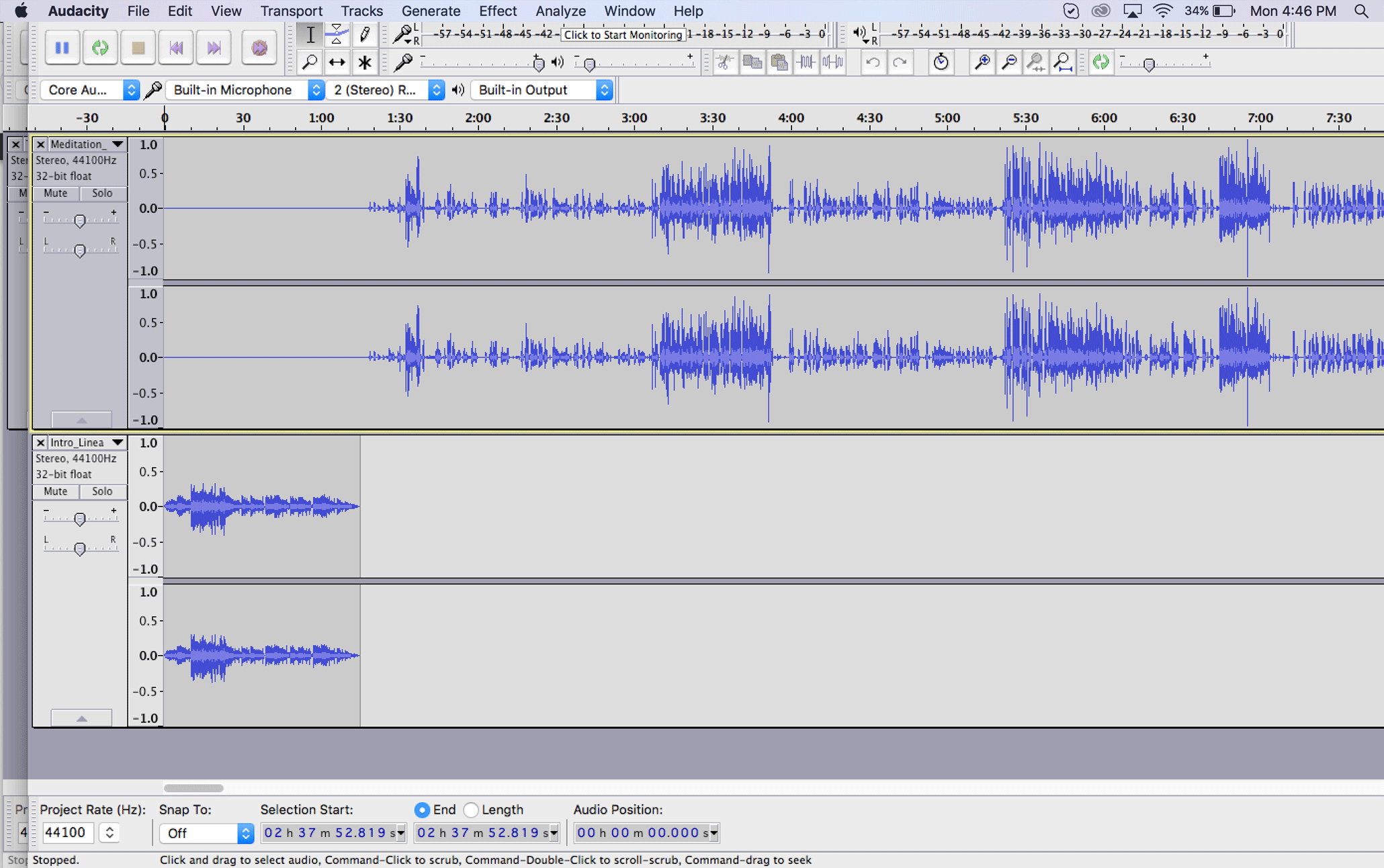
Inside Audacity. The bottom line is an intro file, the top is the episode.
When it comes to sound recording you’re going to face a little bit of a learning curve, sort of like when you first started a blog. There’s lots of new buttons and sometimes you have no idea what’s going on.
If you have a newer Mac or PC you probably have some inbuilt software that will allow you to record a podcast pretty easily. My preference, however, is a free and open-source program called Audacity that is designed to very simply record, edit and save sound files.
My main tip here would be to not pay for any software and instead play around with the podcast recorder on your computer and then download Audacity and see which one you prefer. Again, it’s not necessary to spend money here.

3. Setting up the back-end of your blog for podcasting

The next step is to set up your podcast at the back-end level of your blog. Unfortunately, this is where it can get a little big confusing.
So how does it work?
Essentially a podcast is just a sound file (like an MP3) embedded in a blog post. That blog post is then part of a feed that is picked up by iTunes so that people can be notified of new episodes on their smartphones. What we are doing at this stage is installing a plugin that neatly sends iTunes all of that information automatically.
If it sounds confusing don’t worry too much. All you really need to know right now is that you don’t actually upload your sounds files to iTunes directly but rather create a place/function on your blog so that iTunes knows where to find your podcast episodes.
The first step is to download the Blubrry PowerPress podcasting plugin and install it on your blog. You can do this by logging into your WordPress blog and going PLUGINS > ADD NEW and then using the search function.
powerpress
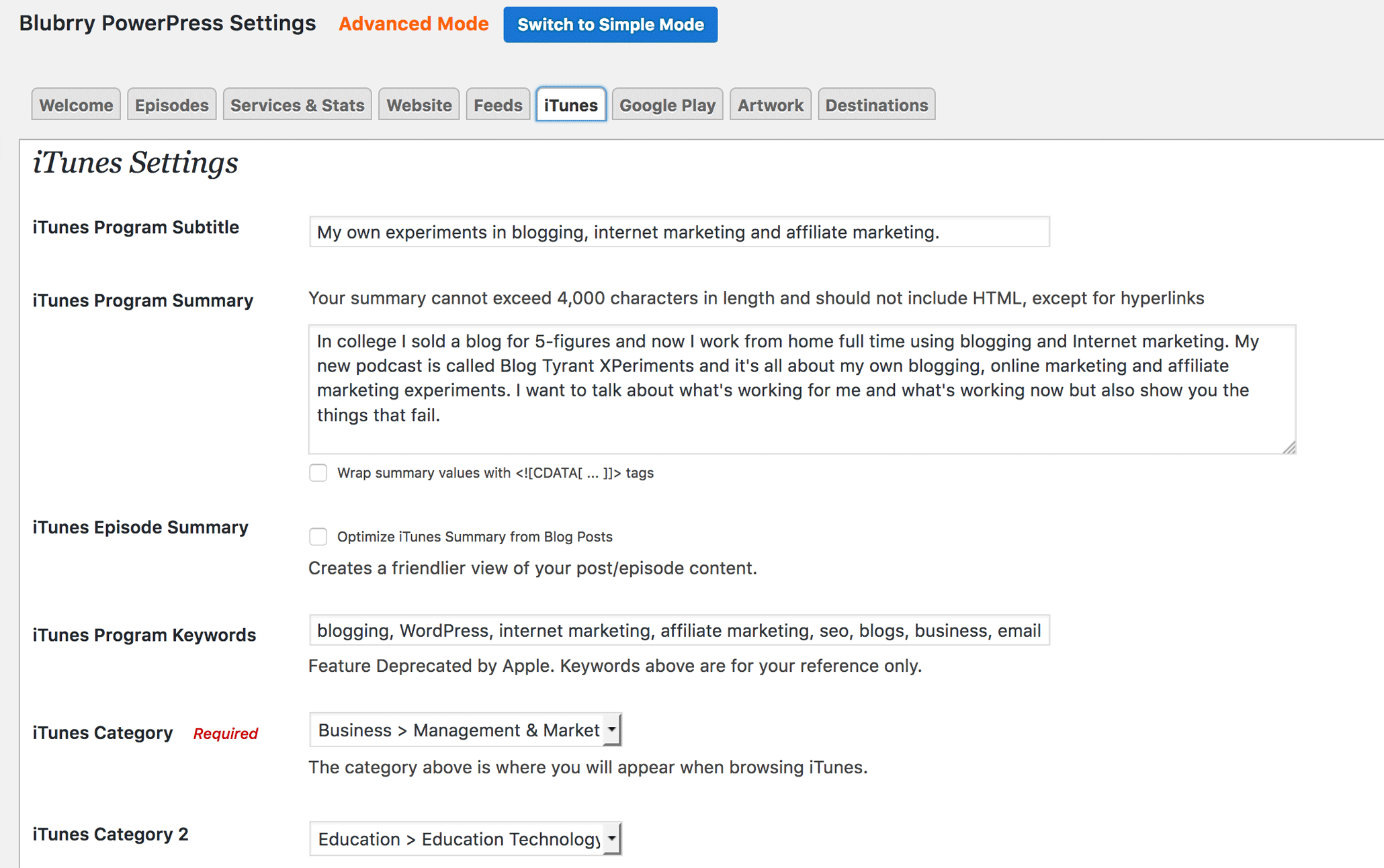
One of the pages inside Powerpress that allows you to create a podcast from your blog.
Once you’ve installed the plugin you’ll get a choice to use a Simple or Advanced Mode of the plugin. For most bloggers the Simple Mode will be sufficient. The Advanced Mode, however, gives you a few more options and allows you to create separate feeds so that, if you wanted, you could run more than one podcast from your blog.
Now, there are dozens of settings to go through here, but the main thing you want to understand is the relationship between your blog’s regular feed, your new podcast feed, and how the plugin lets you configure all of that. I’ve done a short video to cover the main points.
Go through and copy what I’ve done in terms of filling out the areas like iTunes show name, description, category, keywords, etc.
As I said in the video, this was not meant to be a setting-by-setting walk through but rather a quick overview of how the plugin allows your blog to also publish a podcast. If you get stuck on any settings make sure you check out the set up guides provided by Powerpress.

4. Creating your podcast artwork

The artwork that goes along with your show is really important.
Just like with your blog, standing out from the crowd is vital if you want to cut through the competition and get some traction. The way you create your show art and the styles and elements you choose will have a huge impact.
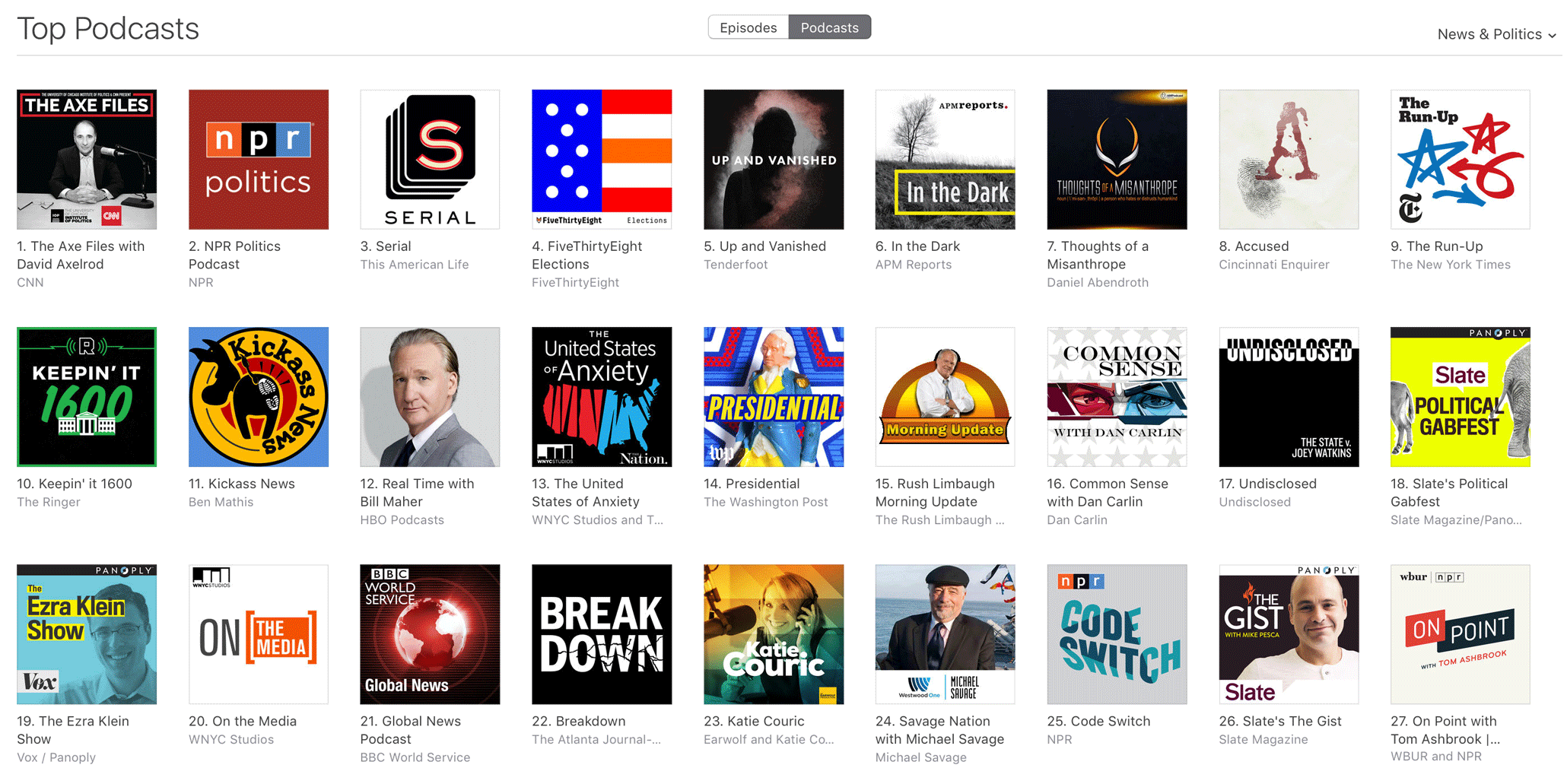
podcast artwork
The current top podcasts in the News and Politics section. Which one stands out most for you?
Have a look at the top shows for the News and Politics section and you’ll see an interesting mix of faces and graphics with no faces but large, heavy text and colors.
If you already have a well known brand it can be a good idea to make that the main feature. If not, a lot of studies have shown that people respond better to human faces then graphics.
Your image needs to be 3000 pixels x 3000 pixels in order to account for retina display screens while still being visible at smaller sizes.
You can create your image in Photoshop or Pixelmator, but I would highly recommend creating a contest on 99designs so as to get a professional to create something amazing. I wrote about how I did that in this post on blog images.
Once you’ve created the artwork, upload it to your blog and then add it to the “Artwork” section within the Powerpress plugin as shown in the video above.

5. Record, save, upload and publish your first episode

Before you can submit your podcast to iTunes you need that podcast feed to become active. And for that to happen you need to publish your first episode.
There are a few tricky steps in this section but, once you’re done, you’ll find the whole thing is easier because the main set up stages are done forever and from here on in you just have to create content.
Recording your first episode
Prepare for recording by making notes on your content talking points and setting yourself up in a quiet room with no distractions. Turn off your phone and make sure you don’t have any computer notifications that might pop up on the screen or make a bing.
Once you’re ready, open up Audacity and test your microphone settings. You can record a few 10 second clips and play them back to yourself to see whether the volume and quality is set nicely. If you run into any problems check out Audacity’s user guide for ideas.
The next thing you need to do is record your episode and add any introductions or music that you might have. You do that by simply going FILE > IMPORT and dragging it to the place you want it on the audio.
Saving (exporting) your first MP3
Once finished, hit FILE > EXPORT and then you’ll see a screen like the one above that asks you to fill out details.
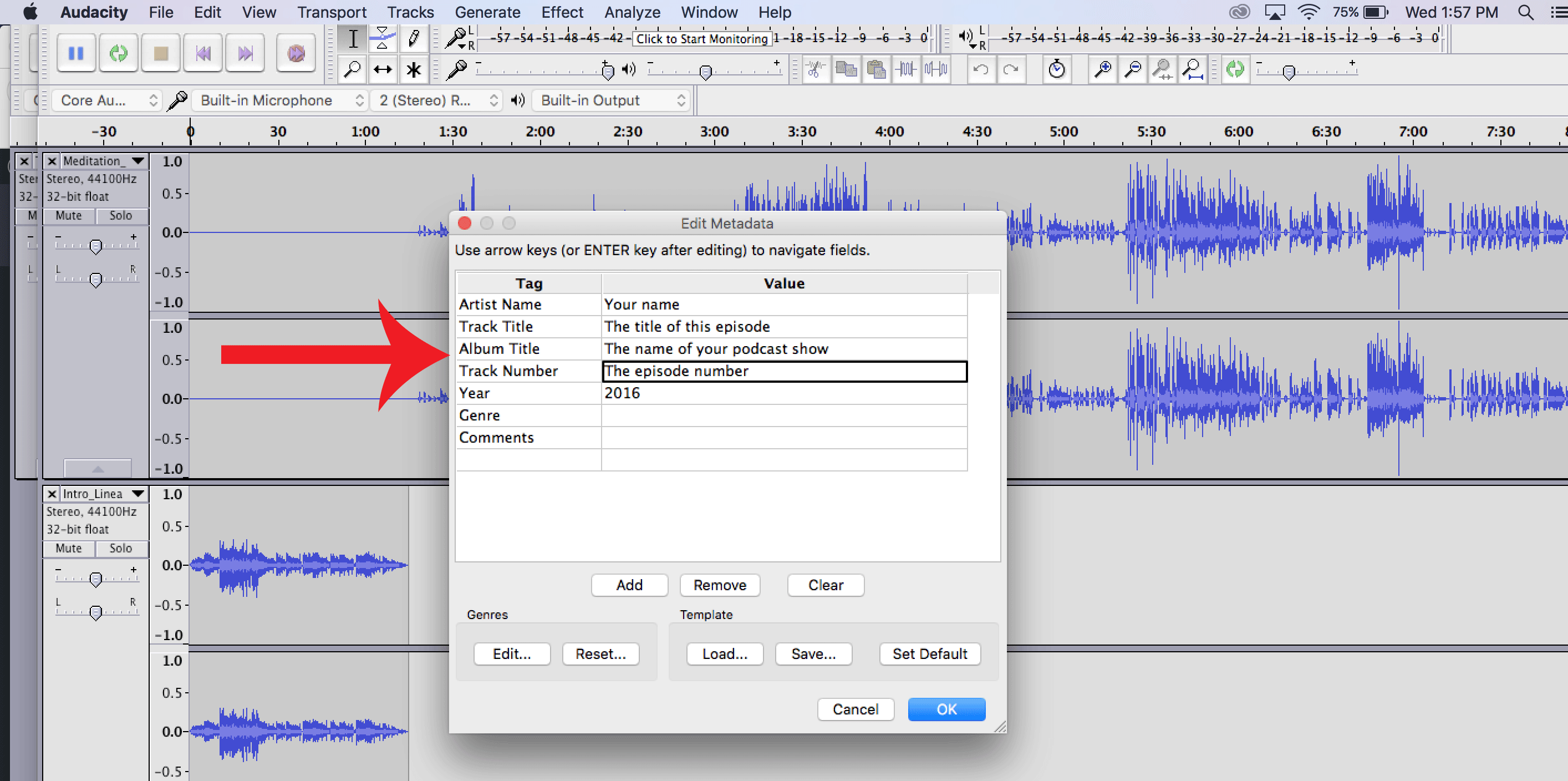
Exporting an MP3
Exporting an MP3 file from Audacity
It’s important that you get these right as it will affect how your file displays in some formats. I’ve put some notes on the image above. Now your MP3 episode will be saved to your computer somewhere and is ready for uploading. If you like, you can listen to it on your desktop to check for any errors.
Uploading your MP3 to a file hosting service
The next step (we’re almost done!) is to upload that file to an MP3/podcasting service like Libsyn. As mentioned above, you don’t want to host these audio files on your blog because you could run into bandwidth issues if you get a lot of downloads. That’s the type of thing that causes your site to crash.
Libsyn is a great service because they don’t penalize you for getting lots of downloads. Instead of paying for bandwidth you pay for what you upload.
For example, for the $15 p/m plan gives you 250MB and you could upload around 2-3 podcasts a month.
This part is important.
Once you’ve chosen your plan, go to CONTENT > ADD FILE FOR DOWNLOAD ONLY > UPLOAD and then hit PUBLISH once you’ve selected your first episode MP3 file.
That will load for a while and then give you a URL of your MP3’s location online. We’re going to need that URL in a minute so leave that page open and/or copy the link.
It should look something like this:
http://traffic.libsyn.com/blogtyrant/blog_security.mp3
Publishing your first episode
Now you need to head over to your blog and go to POSTS > ADD NEW and fill out the headline and body text. Your headline will be the title of this Podcast episode, and your body text will describe what the episode is about as well as including the player and podcasting shortcode.
If you’re not sure what to include in these posts just have a look at what other bloggers like Tim Ferriss do.
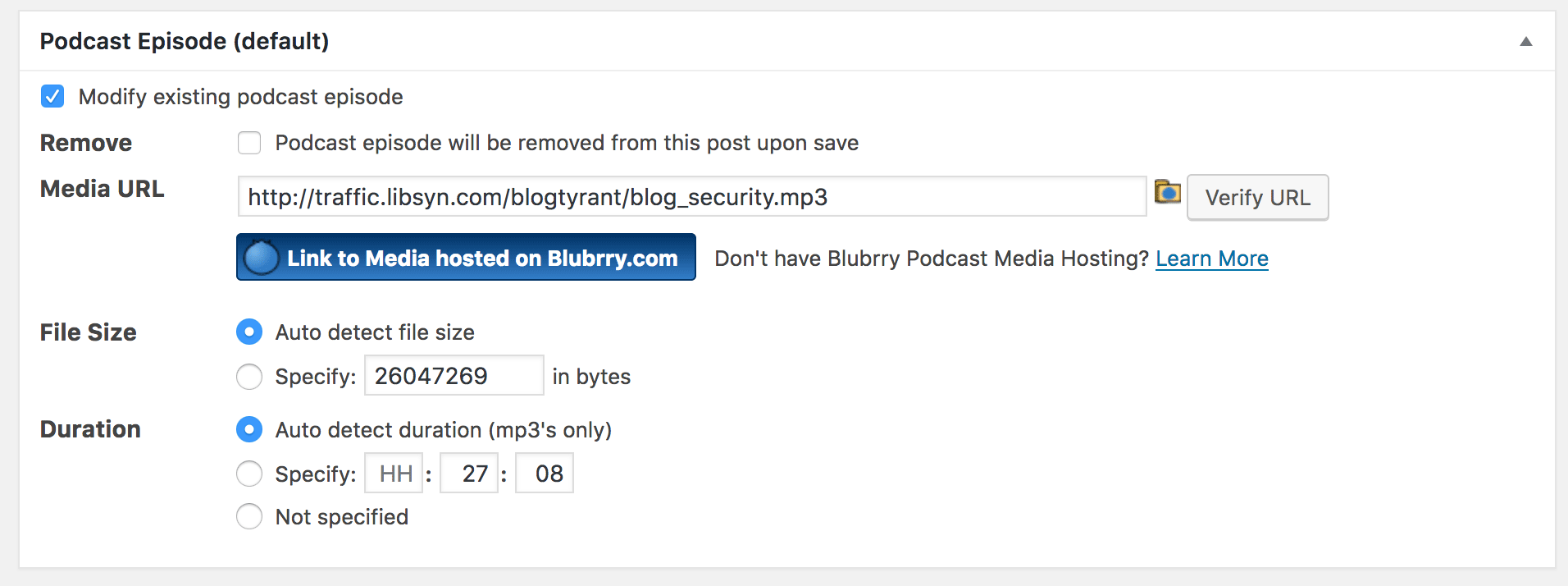
Creating your first episode
Creating your first episode.
Once you’ve done that, go ahead and paste that Libsyn URL from before into the section called Podcast Episode that will appear below your blog post’s content area. Click the Verify URL button as pictured above.
Finally, select the Podcast category, give it some tags and then when you’re all done hit Publish.
You’ve now published your first podcast episode!

6. Submit your podcast to iTunes

By this stage your podcast is live on your blog and all of your readers will be able to listen to it directly from the Powerpress button that appears in the blog post.
But what we really need to do is submit it to the world’s biggest podcasting search engine: iTunes.
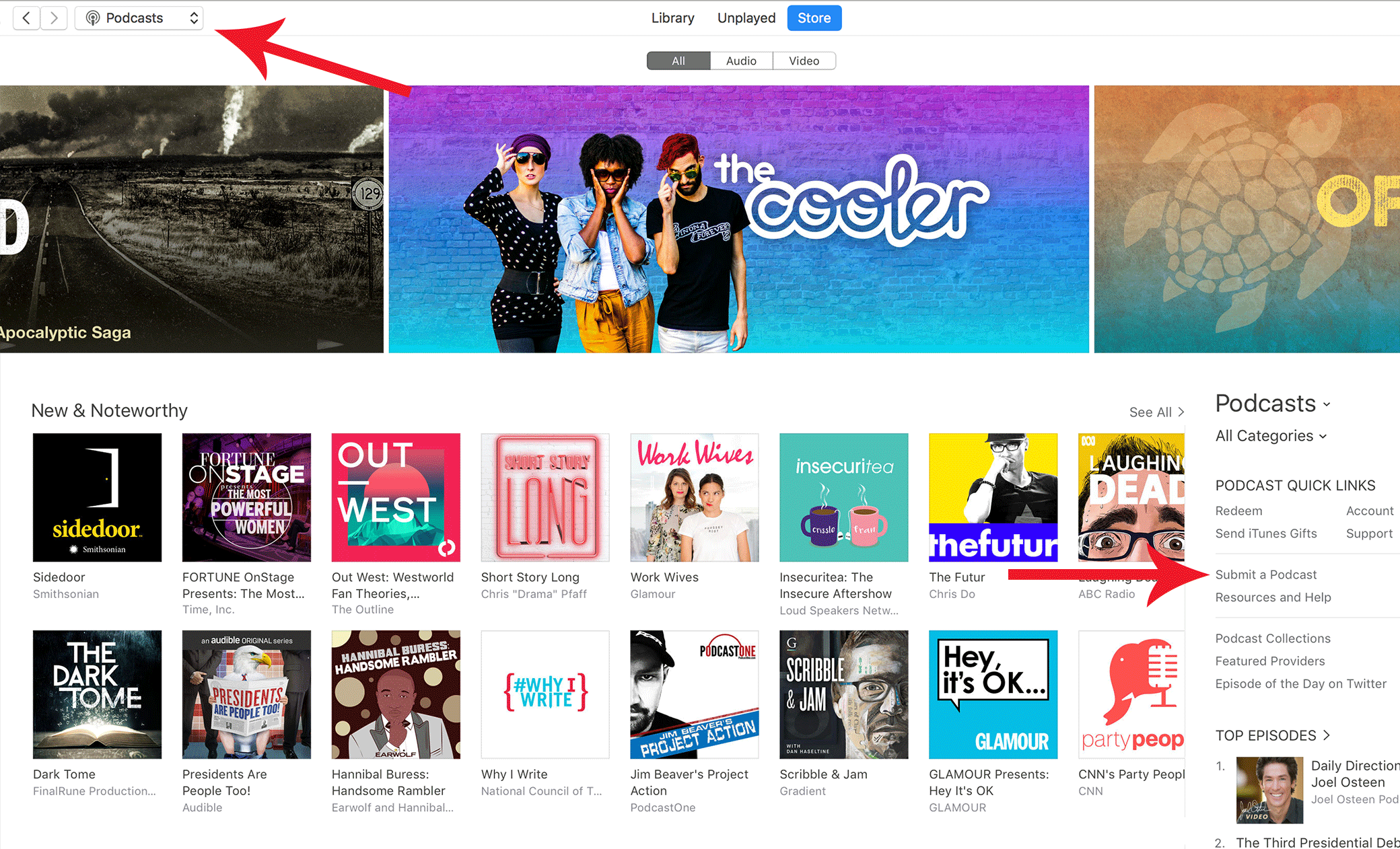
submitting to itunes
Submitting a podcast to iTunes for the first time.
To do this simply log into iTunes with the account that you want to be the “owner” of that podcast. Think carefully about which iTunes account that should be.
Then navigate to the Podcasts section at the top and find Submit a Podcast on the right hand side.
This will then take you to a new screen where it asks you some details and, most importantly, your Podcast Feed URL. This is the URL I showed you in the video above and can be found again by logging into your blog and going POWERPRESS > SETTINGS > FEEDS and then copying the podcast feeds URL.
Mine looks like this: https://www.blogtyrant.com/feed/podcast/
Once you’ve submitted that it will take a few hours or even days to show up in iTunes. Once you see it in there have a careful look at all the text and images and make sure it all looks good. If not, track back through the Powerpress plugin settings and make adjustments.

7. How to promote your blog’s podcast

Unfortunately, a lot of bloggers write incredible posts and then wonder why no one is visiting.
Well, the main reason is because they haven’t done any promotional activities.
Podcasting is exactly the same.
If you want to make sure that you get people listening you need to spend more time promoting it – more time even than you spend creating them!
  • Network with other podcasters
    One of the best ways to get your podcast known is by getting attention from other established podcasters. For example, follow all the top podcasts in your niche and make sure you interact on Twitter when new episodes come out. Help promote them and they might return the favor.
  • Pay for a mention
    Advertising on podcasts is cheap and often very effective. Big shows like RadioLab will be out of reach financially, but there are lots of smaller shows that still have good reach and are looking for advertisers. Keep it in your niche and work with the founder to develop an ad that works.
  • Hype it on your mailing list
    Hopefully if you have a blog you’ve also been building a mailing list and as such you can do a little promotional campaign that might involve some giveaways or a special release date. Don’t be afraid to ask for shares in this situation – if you’ve been providing value people won’t mind.
  • Ask your friends for reviews
    When you first launch your podcast it’s a good idea to ask your friend and family to leave a 5-star review on iTunes. The more reviews you can get in the first few hours the more chance you have of hitting the New and Noteworthy section which can really boost your exposure. Ask nicely and give easy-to-follow instructions.
  • Align your podcast with popular events
    A very successful promotional technique is to align your podcast with things that are going on in the world. For example, a lot of podcasts popped up around the time of the Star Wars movie release and had graphics and names that looked and sounded like Star Wars in some way. These shows get a lot of attention in search engines. For example, if you’ve done any episodes near the election with “Trump” in the title you’ll likely get some love from people searching for answers.
One of the big things to remember here is that it’s not likely that your podcast will be a massive smash hit right away. Sometimes it takes months and years of work to build up a loyal audience and get the traction that you were hoping for.
It’s also good to remember that sometimes opportunities arise from podacasting even when you don’t have a huge audience. It might just be a new business contact or a collaboration that takes place.
So, don’t discount it if you don’t have immediate success.

Bloggers, do you have a podcast?

This post covered quite a lot of information but also left quite a lot out.
I deliberately tried to make it a “broad strokes” type of thing instead of getting into too many details, but I’d love to know if I’ve missed anything really important that might impact someone trying to get started.


How To Use Prezi


Hi, everyone! I want to share an interestion video "How to use Prezi"by Josh Schorle Tech
In this tutorial, he'll show you how to use the online zooming presentation software known as Prezi. Josh`ll also walk you through the steps of how to add multiple background layers. Enjoy!🔉🔊💹